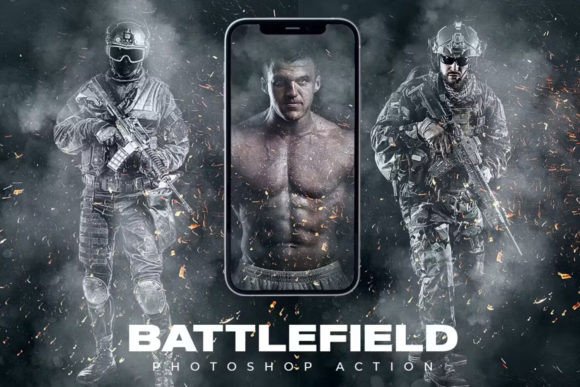
Battlefield Photoshop Action: Create Cinematic Drama Fast
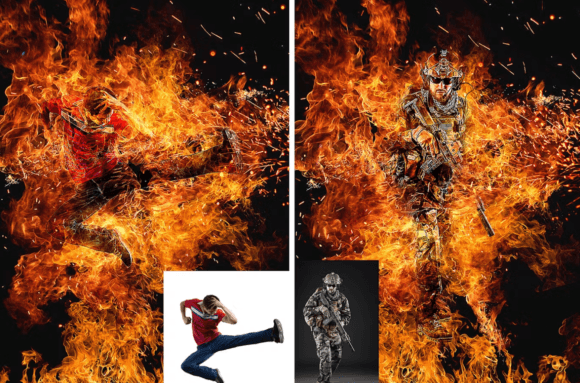
Transform your photos into cinematic battle scenes with the Battlefield Photoshop Action. This powerful tool brings a dramatic, action-packed look to any image with just a few clicks. Whether you're a beginner or a seasoned designer, this action streamlines the editing process, letting you focus on creativity instead of technical details.
Designed to work seamlessly in Photoshop CS6 and CC versions, the Battlefield Action includes all the tools you need—ATN actions, ABR brushes, PAT patterns, and a helpful user guide. Once installed, you can start enhancing your visuals instantly, no advanced skills required.
How Battlefield Photoshop Action Works
The beauty of this action lies in its simplicity. It automates complex editing steps, applying cinematic lighting, gritty textures, and atmospheric effects that mimic battlefield environments. With a single click, your photo can shift from ordinary to warzone-inspired, complete with smoke, dust, and dramatic shadows.
Each action is built with well-organized layers and folders, giving you full control over the final output. You can adjust individual elements like color grading, texture intensity, or lighting effects to match your vision. The RGB mode and 8-bit color support ensure high-quality results that look sharp across digital and print formats.
Creative Possibilities with Battlefield Action
This action opens up a wide range of creative applications. Here are a few ways to use it across different projects:
- Portrait Enhancement: Add drama to character portraits, giving them a heroic or mysterious edge.
- Game Promos: Design promotional materials that match the gritty tone of action and war games.
- Editorial Imagery: Give photo essays and journalistic visuals a powerful visual impact.
- Movie Posters: Use the cinematic look to craft compelling movie or short film posters.
- Social Media Content: Stand out with bold, high-contrast visuals tailored for platforms like Instagram or TikTok.
Because the Battlefield Photoshop Action works on any photo, you're not limited by subject or genre. Whether you're editing a model shoot, a landscape, or a still life, you can infuse it with cinematic intensity.
Customizing the Battlefield Look
While the action delivers stunning results out of the box, the real value comes from how you adapt it. Each layer is adjustable, so you can fine-tune the effect to match your project’s tone and style. Here are a few tips to get the most from your edits:
- Start with Strong Source Material: Use high-resolution images with good contrast and lighting for best results.
- Experiment with Blending Modes: Try overlay, soft light, or multiply to blend effects more naturally into your image.
- Mask and Refine: Use layer masks to hide or reveal effects in specific areas, such as focusing the drama on a subject’s face or background.
- Combine with Other Effects: Layer the battlefield look with other Photoshop tools to create a hybrid style that's uniquely yours.
- Test Across Formats: Preview your design on mobile and desktop to ensure clarity and visual impact across platforms.
Who Can Benefit from Battlefield Photoshop Action?
This tool is ideal for a wide range of users looking to elevate their visual storytelling:
- Photographers: Add dramatic flair to portraits, event photos, or conceptual shoots.
- Graphic Designers: Speed up your workflow while delivering high-impact visuals for clients.
- Content Creators: Make your thumbnails, banners, and social media posts stand out.
- Marketers: Use cinematic visuals to capture attention in ads and promotional campaigns.
- Freelancers: Offer enhanced editing services without spending hours on manual effects.
- Bloggers & Educators: Create engaging visuals for tutorials, articles, and online courses.
Whether you're creating for business or personal expression, the Battlefield Photoshop Action gives you a professional-grade tool that's easy to use and adaptable to your goals.
Getting Started with Installation and Use
Installation is straightforward. Simply load the ATN, ABR, and PAT files into your Photoshop presets and follow the included instructions. The action works best with the English version of Photoshop, so make sure your software is set accordingly.
Once installed, open your image, select the action, and press play. The process runs automatically, applying layers and effects in a structured way. You can then tweak individual settings to refine the result.
For those new to Photoshop actions, a video tutorial is included to guide you step-by-step. This ensures even beginners can achieve polished, cinematic results without confusion or frustration.
Final Thoughts: Make Your Visuals Feel Larger Than Life
The Battlefield Photoshop Action is more than just an editing tool—it's a creative shortcut that helps you bring bold, cinematic energy to your work. Whether you're crafting visuals for a client, a personal project, or your brand, this action gives you the power to create with confidence and speed.
By combining automation with customization, it empowers you to explore new visual styles without sacrificing control. The result? Striking, memorable images that stand out in today's fast-moving visual landscape.