Enhance Your Designs with the Fireworks Photoshop Action
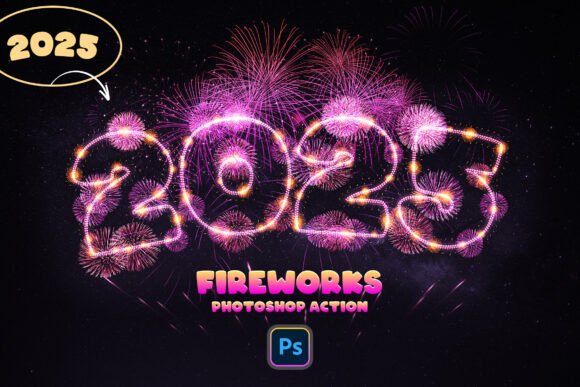
Are you looking to add a vibrant and celebratory flair to your design projects? The Fireworks Photoshop Action is a powerful tool that allows you to transform any text, logo, PNG image, or vector shape into stunning, realistic fireworks with just one click. Whether you're working on event promotions, festive designs, or digital art, this action brings an instant spark of celebration to your visuals.
Why Use the Fireworks Photoshop Action?
Designers often seek tools that streamline their workflow while delivering high-impact results. The Fireworks Photoshop Action checks both boxes. It's not just about speed — it's about creating visually compelling content without the hassle of manual layering and effects. With just a few seconds of processing time, you can generate fireworks that look dynamic and lifelike, giving your designs a professional edge.
This action is particularly useful for:
- Event designers creating promotional materials for holidays, birthdays, or concerts.
- Graphic artists working on themed digital illustrations or concept art.
- Marketing professionals designing social media assets or banners that need to stand out.
Seamless Integration and Compatibility
One of the standout features of the Fireworks Photoshop Action is its compatibility across Photoshop interfaces. Regardless of the language your Photoshop is set to — be it English, Spanish, Japanese, or any other — the action works flawlessly. This multilingual support makes it a versatile choice for global designers who don't want language barriers to limit their creativity.
Additionally, the action supports a wide range of design elements:
- Text layers
- Smart objects
- Groups
- Pixel layers
This flexibility ensures that no matter your project type, you can apply the fireworks effect with ease.
Optimized for Large Canvases
For best results, it's recommended to use the Fireworks Photoshop Action on large canvases — such as 6000x4000 pixels — to fully capture the expansive and detailed nature of fireworks. This resolution ensures that every spark and trail is crisp and vivid, especially when the design is scaled for print or high-resolution digital use.
Working with larger canvases also gives you more creative freedom. You can zoom in without losing quality, adjust individual firework elements, or layer multiple effects without cluttering your design.
What You Get in the Fireworks Photoshop Action Package
Purchasing the Fireworks Photoshop Action gives you a complete toolkit for creating dazzling visual effects right out of the box. The package includes:
- ANT File – The main action file that you load into Photoshop for instant effects.
- ABR File – A set of custom brushes that complement the fireworks effect and can be used independently for other projects.
- PSD File – A ready-to-use template that helps you jumpstart your design process.
- PDF Guide – Step-by-step instructions to ensure even beginners can use the action confidently.
This comprehensive set ensures you’re not just getting a single-use tool, but a resource that enhances your overall design capabilities.
How to Use the Fireworks Photoshop Action
Using the Fireworks Photoshop Action couldn’t be simpler. Here’s how you can start creating in seconds:
- Select the layer you want to apply the fireworks effect to — whether it’s text, a logo, or a vector shape.
- Open the Actions panel in Photoshop and locate the Fireworks action.
- Click “Play” and watch as the action transforms your selected layer into a vibrant fireworks display.
That’s it. No complex settings or adjustments needed. Of course, you can always tweak the outcome by modifying layer styles, blending modes, or color overlays to better fit your design vision.
Practical Design Applications
Let’s explore some real-world scenarios where the Fireworks Photoshop Action can make a significant difference:
- Concert posters – Use the fireworks effect to highlight a band name or event title, creating a sense of energy and excitement.
- Wedding invitations – Add a celebratory touch to a “Just Married” graphic or a New Year’s Eve invitation.
- Logo animations – When designing for video or motion graphics, the action can be used as a base for animated logo reveals.
- Social media posts – Make your announcements pop with a fireworks background or border.
Design Tips for Best Results
To get the most out of the Fireworks Photoshop Action, consider the following tips:
- Use a dark background – Fireworks look most vibrant against dark or black backgrounds. This helps the colors stand out and mimics the natural setting of a fireworks show.
- Experiment with layer blending – Try blending modes like “Screen” or “Add” to enhance the glow and light effects.
- Layer multiple fireworks – For more complex designs, apply the action to multiple layers and vary the size and color for a more dynamic composition.
- Customize colors – If you want specific color schemes, adjust the hue and saturation of the fireworks after the action is applied.
Who Should Use the Fireworks Photoshop Action?
This action is ideal for both beginners and seasoned designers. If you're just starting out, the included PDF guide ensures you can follow along easily. If you're a professional, the time-saving nature of the action allows you to focus more on creative direction and less on repetitive tasks.
It’s particularly valuable for those who:
- Need to produce high-quality visuals quickly.
- Work on seasonal or event-based projects.
- Want to add visual interest without mastering complex Photoshop techniques.
Final Thoughts
The Fireworks Photoshop Action is more than just a flashy effect — it's a versatile and time-saving tool that enhances your creative workflow. Whether you're designing for personal projects, client work, or commercial use, this action delivers stunning results with minimal effort. Its ease of use, compatibility, and adaptability make it a must-have in any designer's toolkit.